Nov 28, 2025
How FileMap Reduces Micro-Frictions in Digital Workflows
Designers lose time and energy through tiny, repeated actions.
Creating a folder. Renaming a file. Searching for an export. Copying a path into a “Save As…” window. Switching to a browser to find a reference you downloaded minutes ago. Navigating through nested directories because a tool needs you to locate the right asset.
Each action seems minor in isolation. But together they create continuous, low-level friction that slows work, increases mental load, and interrupts creative momentum.
This post explores what micro-frictions are, why they matter in digital design, and how FileMap is built to reduce them so designers can work with greater clarity and flow.
The invisible tax of micro-frictions
Digital design workflows are made of two layers.
The first is creative production: designing, modeling, editing, composing, iterating.
The second is operational maintenance: clicking, navigating, organizing, naming, exporting, searching, and switching between tools.
The second layer is necessary, but it accumulates into an invisible tax. Micro-frictions consistently produce three outcomes.
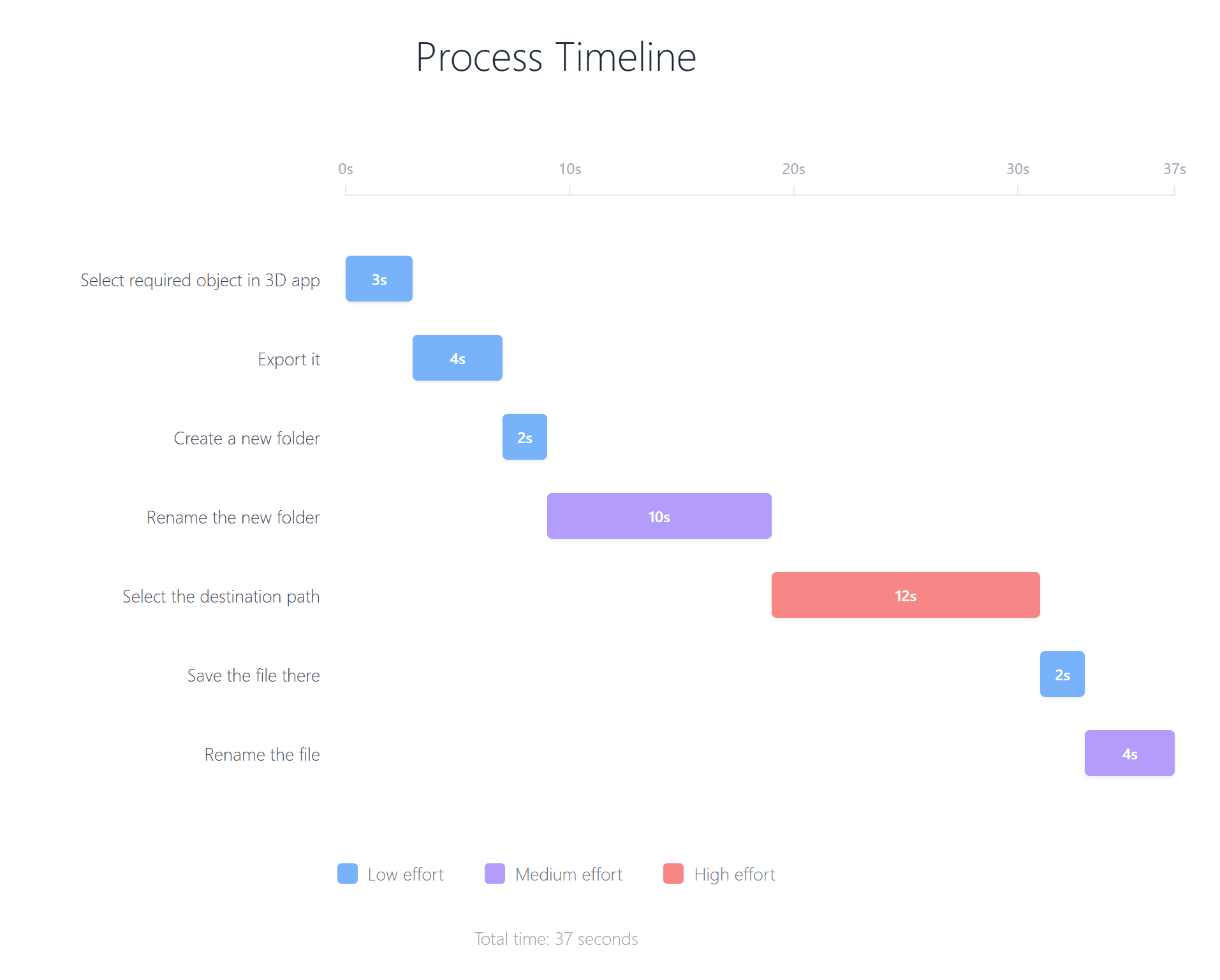
They cost time. A few seconds repeated hundreds of times become significant overhead.
They increase cognitive load. Each moment spent recalling where something is, deciding where it should go, or confirming which version is current pulls attention away from design thinking.
They disrupt flow. Creative flow depends on continuity. Frequent interruptions require the mind to re-orient, delaying re-entry into the work.
Micro-frictions are not simply inefficiencies. They shape the quality of the entire creative experience.
Why file management becomes a design problem
In conventional workflows, file management is separated from creative work.
Creative software is where ideas are produced. File managers are where work is stored and retrieved. Browsers are where references are collected. Render engines or export pipelines are where results are finalized. The desktop often becomes a temporary holding area for items that need immediate attention.
Designers move across these spaces constantly.
This switching is not neutral. Every transition between tools creates a contextual reset. The mind must briefly pause, locate itself, and re-establish intent. Over time, the project can feel fragmented across locations rather than unified as a single evolving story.
When the project’s context fragments, sustaining creative momentum becomes harder.
When you enter a folder to find something, your eyes scan the contents, looking for familiar icons and names. Once you go into a subfolder, you need time and energy to re-orient yourself. This repeats at every step—each folder you open—until you find what you need, and the same journey is repeated every time you want to reach that item. While it’s true that we may become habituated after a few hundred visits to the same file in a project, the time and energy overhead can only be reduced to a certain extent.
FileMap, on the other hand, makes everything visible and lets users reach any item through visual memory in seconds. By doing so, it reduces the constant context switching we experience with default file managers. The user interface becomes a continuous, uninterrupted zooming experience. And because the layout is flexible and choreographed, the graphic arrangement itself provides visual context for finding files. The eye can triangulate what it needs more easily.
FileMap’s core philosophy
FileMap is grounded in a simple principle.
Micro-frictions meaningfully affect creativity. Reducing them supports not only efficiency, but also the continuity and coherence of design thinking.
FileMap addresses micro-frictions by changing how a project is represented.
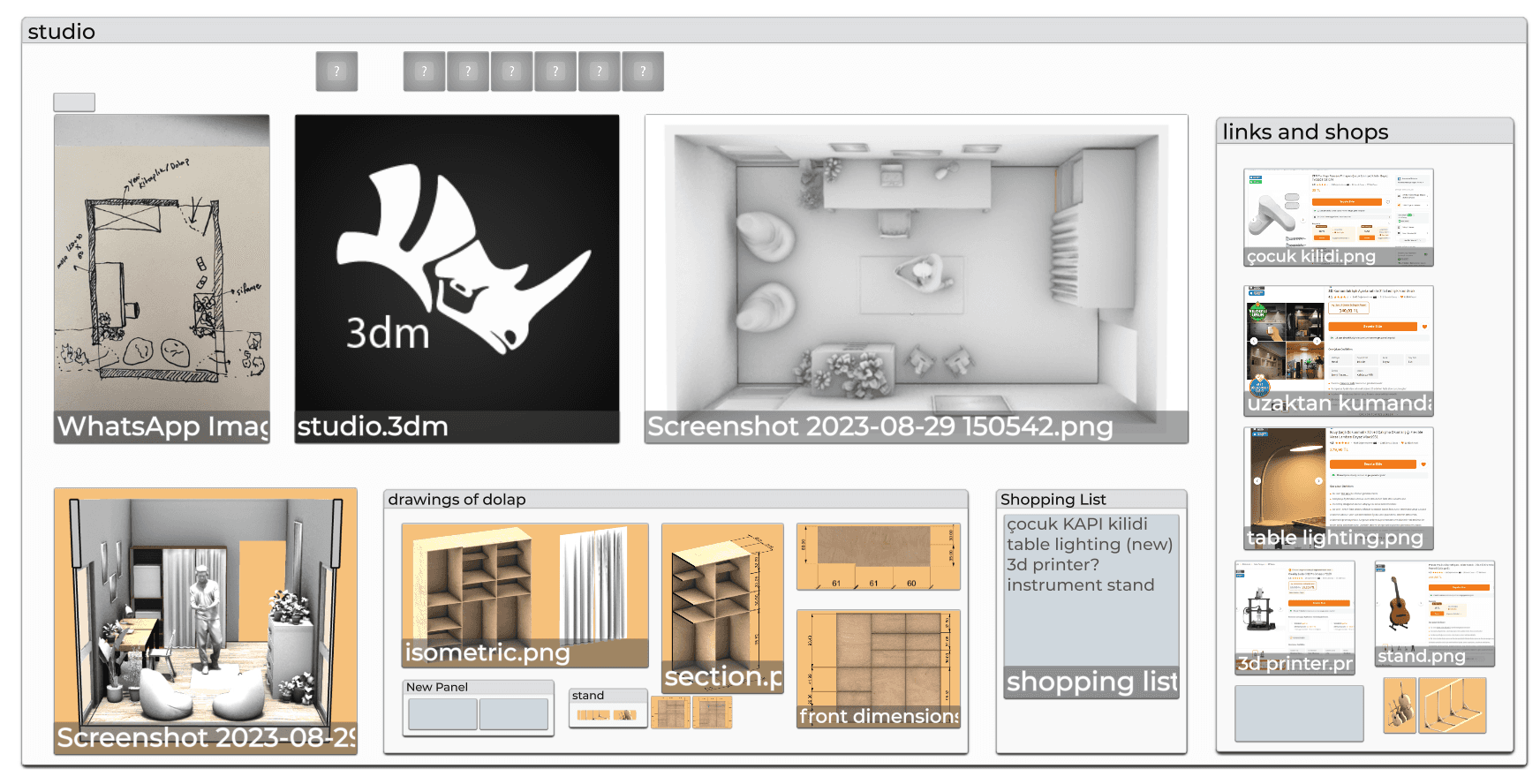
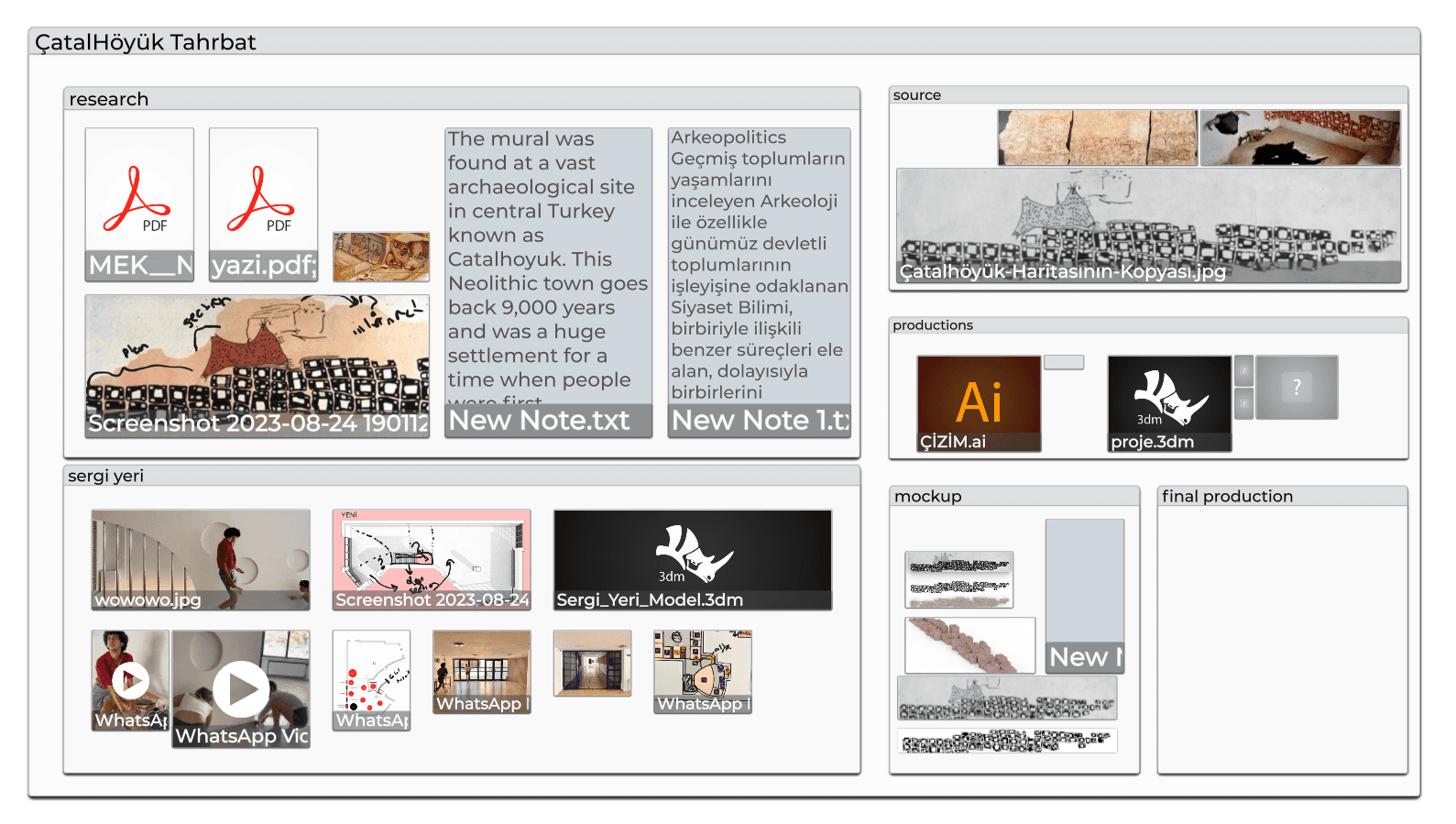
Instead of hiding work inside directories and paths, FileMap makes the project visible on a shared canvas. Structure and content are seen together. Materials, drafts, exports, and references coexist in one coherent spatial layer. This preserves the logic and narrative of work as it develops.
FileMap is not only organizing files. It is organizing the way projects are understood.
How FileMap removes micro-frictions
It shifts “finding” into “seeing”
Traditional file managers require exploration. You open folders to see contents, navigate deeper to locate a specific asset, and repeat this process to re-establish context.
FileMap reduces the need for exploration by presenting the project directly. The workspace offers immediate visibility into what exists and how it is organized. Instead of repeatedly searching for structure, designers can absorb structure at a glance.
This reduces time spent browsing and the mental effort required to remember where things are.
It preserves the visual story of a project
Designers rely on relationships more than locations.
A model relates to its references. A texture relates to its render tests. A draft relates to its iterations. These connections form a project narrative.
FileMap preserves that narrative spatially. The workspace becomes a visual record of process, allowing designers to return to previous stages quickly, continue work without reconstruction, and communicate the project clearly to others.
When the story remains visible, the work remains coherent.
It reduces dependence on paths
Many digital tools still operate through directory logic.
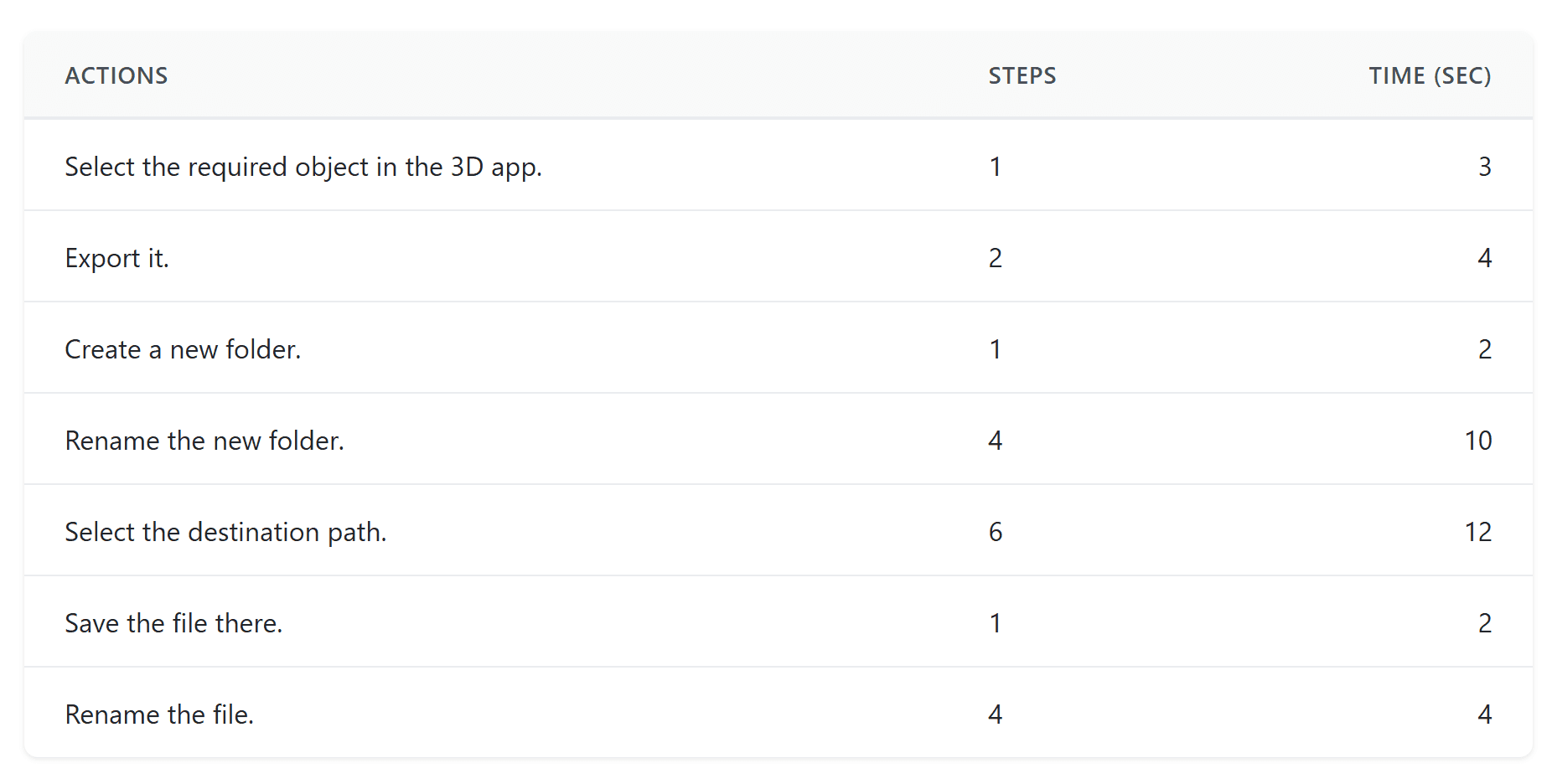
Save dialogs ask for locations. Import windows ask for paths. Render engines require file references. Designers often become the bridge between operating system structure and creative intent.
Because FileMap maintains a visible, purpose-based structure, it reduces the effort needed to locate destinations or supply paths. Your exports, sources, materials, and drafts already live in clear, contextual positions.
This decreases the frequency of path hunting and the interruptions that come with it.
It anchors multi-tool workflows
Design work is inherently multi-tool.
A single project regularly spans creative applications, file systems, browsers, render engines, and communication platforms. The cost of switching compounds when no consistent project surface exists.
FileMap provides that surface. Creative tools become focused production spaces, while FileMap remains the stable project environment you return to. This makes transitions less disruptive because designers re-enter a workspace that already contains the project’s full context.
The workflow becomes more continuous rather than fragmented.
How File Previews Save Time and Reduce Effort
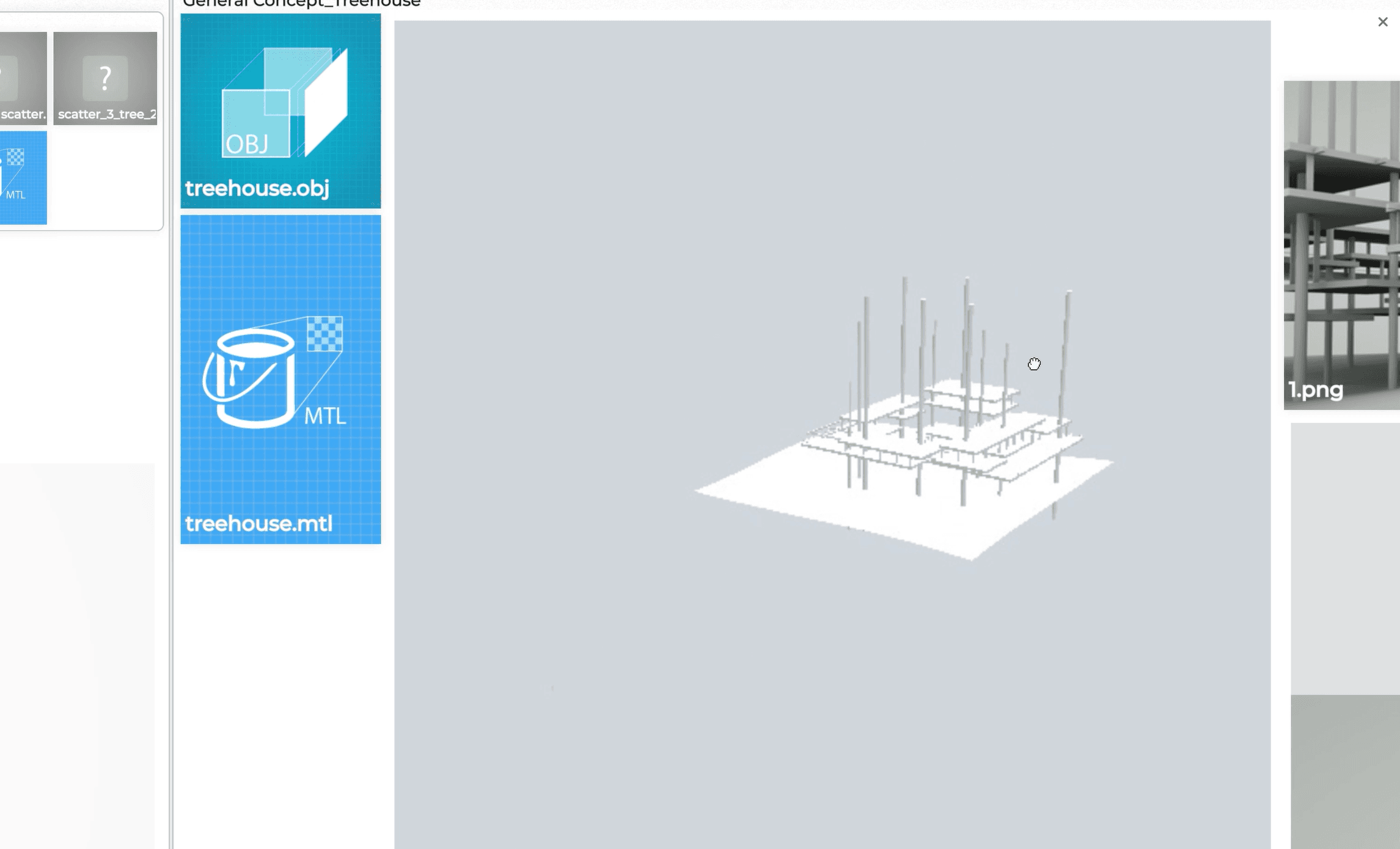
FileMap’s previews reduce friction in a few very practical ways. First, designers don’t need to open a file just to figure out what it contains. People often open files only to check their content because names or icons are unclear, or because they want to confirm they have the right version. Seeing the content instantly removes that extra step. Second, previews save even more effort with heavy files, especially 3D assets. Opening applications like 3ds Max can take a long time and it disrupts focus, so being able to understand a model without launching the full software protects both time and attention. Third, fewer forced app launches means fewer floating windows cluttering the desktop. As the number of open apps grows, switching and navigating across them becomes mentally expensive. By letting users check and compare files directly in place, FileMap keeps the workspace cleaner, reduces mental load, and prevents unnecessary detours away from creative work.
The research method behind these insights
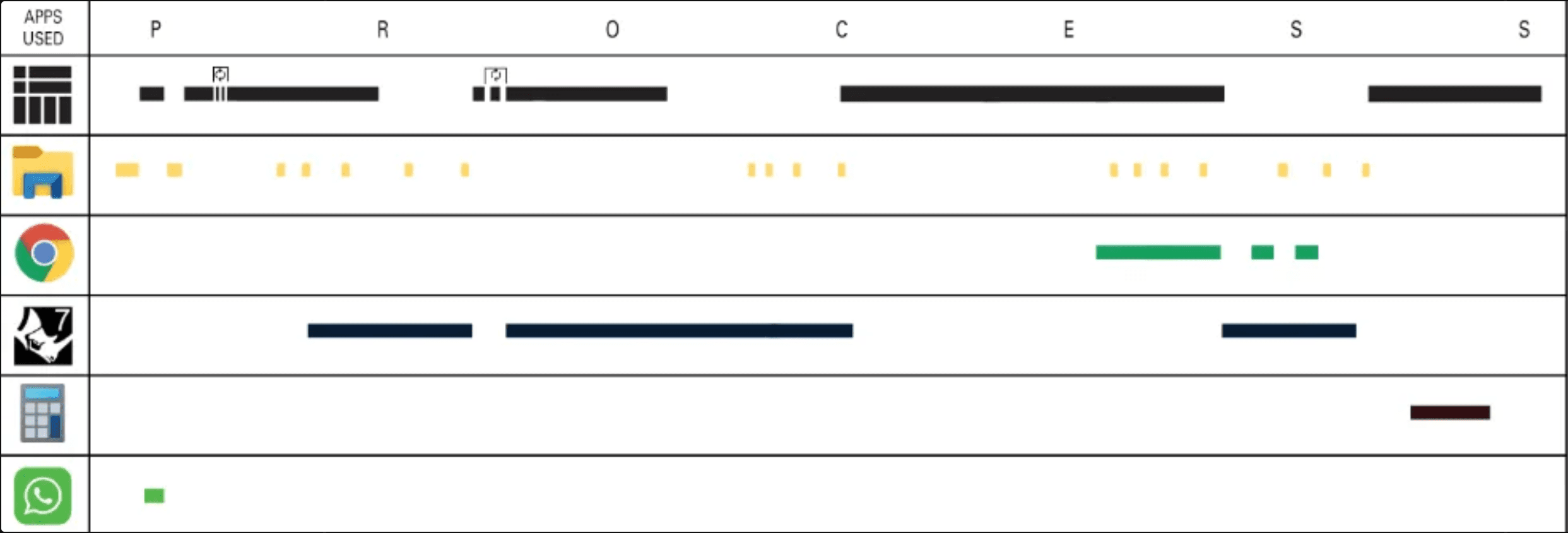
To study micro-frictions in real conditions, we used behavioral mapping.
Designers worked on authentic projects while we recorded their screens. Every action was classified as an atomic event: clicks, drags, renames, saves, searches, exports, and application switches.
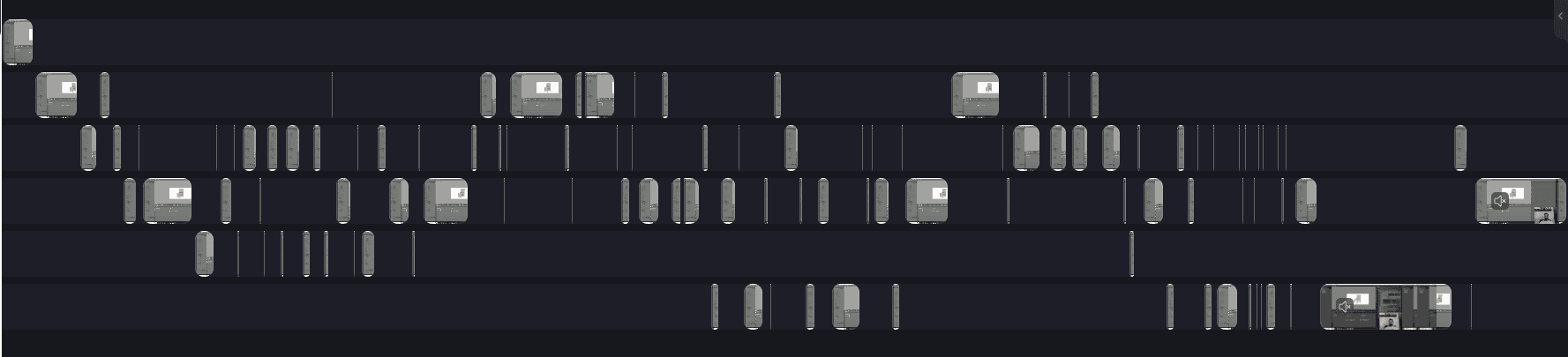
We then mapped these events on a timeline.
We used video-editing tools such as Premiere Pro to split the full process recording into separate videos for each app, placing each on a different channel for analysis.
Time was placed on the horizontal axis. Tools were placed on the vertical axis.
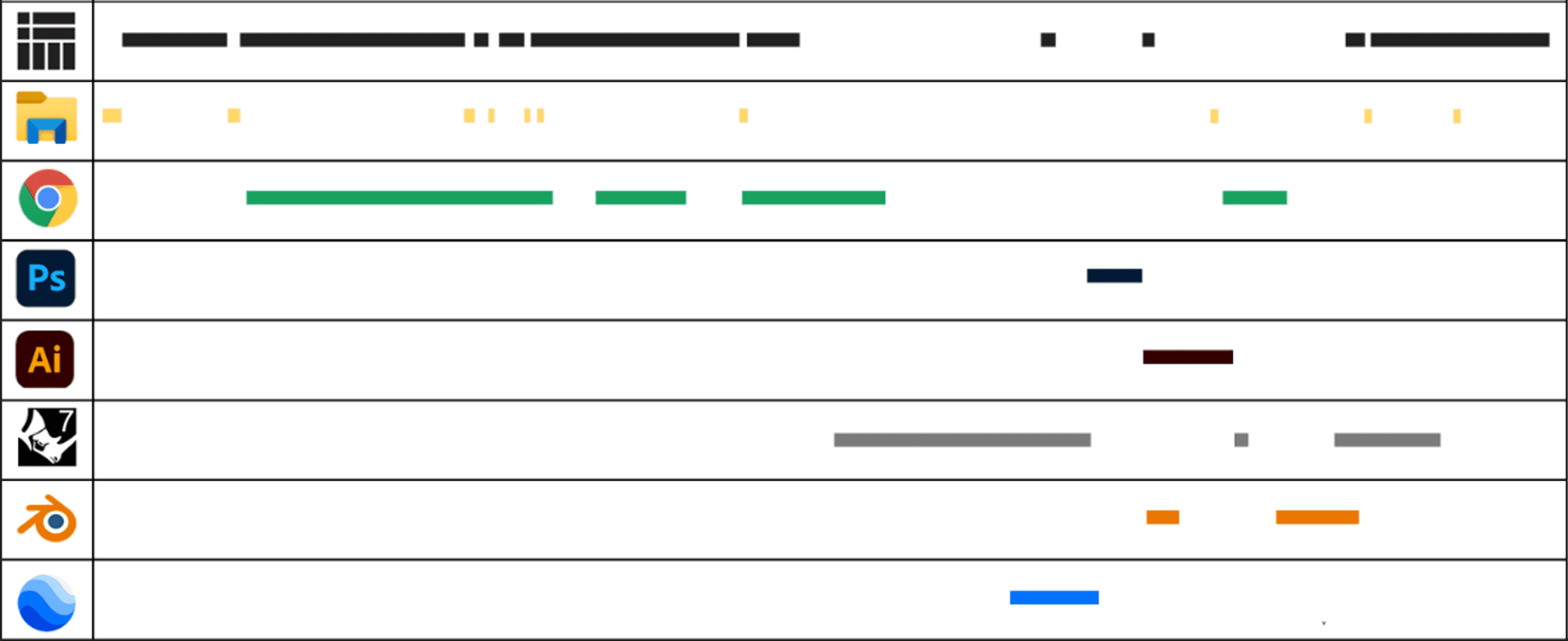
These visuals reveal a fundamental reality of digital design. Work is not linear. It is defined by frequent switching and micro-tasks layered around creative production.
When FileMap becomes central to the workflow, the timelines change. There are fewer detours into nested folders, fewer search interruptions, and stronger anchoring in a single visible workspace. The switching pattern becomes smoother, and the workflow shows greater continuity.
The method makes what is usually invisible measurable and designable.
Why removing friction matters beyond speed
FileMap saves time, but the deeper value is experiential.
Micro-frictions are small interruptions that carry a disproportionate risk. Each one can break flow, weaken focus, and reduce the continuity of imagination.
Imagine you’re working on an existing building design. You’re deep in 3D modeling, picturing how people will move through the space, and you’re fully in a flow state. Then you remember you built similar architectural models in two previous projects, and you want to bring them into your current design.
With a default file manager, your concentration shifts immediately. You start recalling where those old project folders live, which files are the latest, and how to navigate through layers of directories to reach them. Even spending one or two minutes retracing those paths can dissolve the flow you had while designing. Your excitement drops, frustration rises, and you may feel the need to step away just to recover your focus.
In FileMap, the experience is the opposite. You can zoom into those earlier workspaces, locate the related 3D models through visual memory, and copy‑paste those models into your current project in seconds. The creative thread stays intact, so you can continue designing without leaving the mental world of the project.
When friction is reduced, several benefits emerge simultaneously.
Coherence increases because project elements stay connected and visible within a narrative structure.
Enjoyment rises because designers spend less energy on operational maintenance and more on creative exploration.
Resonance improves because the workspace expresses relationships and meaning, not only storage.
Harmony becomes possible across multiple media types and tools, all held within one comprehensible surface.
Ultimately, reducing micro-friction strengthens the bridge between ideas and outcomes. It allows designers to stay in the project’s world longer, with fewer interruptions from the interface.
Try it within your own process
The most direct way to evaluate FileMap is through real use.
Start your next project inside FileMap. Link the folders you already rely on. Bring in references, drafts, models, exports, and notes. Keep the workspace open as you work across tools.
Then observe what changes.
How often do you navigate folder paths now?
How often do you interrupt your work to locate or confirm something?
How easy is it to understand the project at a glance?
How does it feel to return to a workspace that preserves your full context?
Micro-frictions are easiest to recognize once they begin disappearing.
If you want a more visible, coherent, and fluent design workflow, test FileMap on a real project and experience how much smoother the process can become.
What is next: Beyond files - reducing friction across apps and the web
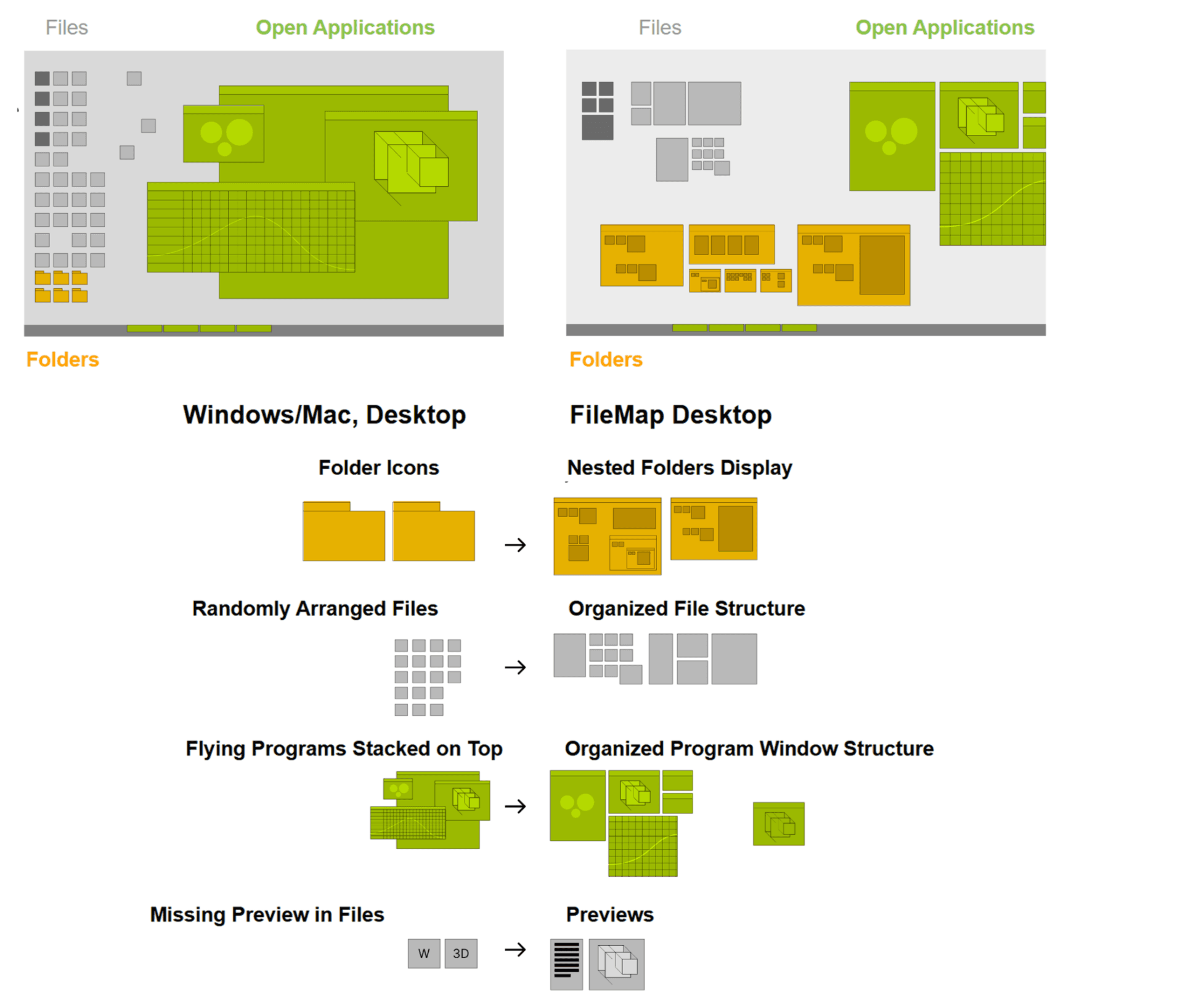
Another major source of micro-friction is application switching. FileMap already reduces the back‑and‑forth between creative tools and default file managers by keeping project content visible and reachable in one place. The next step is to reduce friction between applications themselves.
We are developing features that map running applications directly into FileMap. Instead of navigating through complex window stacks on your desktop, you will be able to zoom to your tools from the same workspace where your files live. If multiple FileMap items are associated with the same software, each item will surface the relevant instances that are currently open in the background, so you can move between the right files and the right tools without losing context.
This completes the unification of files, folders, and applications inside a single project surface.
In parallel, we have introduced a web viewer. This allows users to place web research into the FileMap layout, with each browser tab represented as an object on the canvas. Research, references, and production can therefore coexist in one visual environment, further reducing the need to jump across disconnected spaces.