I have spent most of my working life inside two kinds of space. The first is physical. I trained as an architect, and I learned to think with rooms, walls, distances, and views. The second is digital: folders, windows, and tabs. The difference between how these two spaces treat a human being is the subject of this essay.
In a building, you always know where you are. You remember where things happened, and the space itself helps you remember. In a file system, you are nowhere in particular. You are looking at a list, and behind that list is another list.
I believe this difference is not cosmetic. It shapes how well we think.
What windows and folders do to thinking
The desktop interface most of us use every day took its familiar shape in the 1980s, in a world without AI and mostly without the internet. Its core moves are still the same: open a window, cover the last one, hunt through a tree of folders, switch to another application, and try to remember what you were doing.
Each of those moves is a small interruption. One interruption costs little. A working day made of hundreds of them costs something much larger: the continuity of thought. In my experience, the moments when good ideas connect are exactly the moments most easily destroyed by hunting for a file.
There is a second problem: silos. A design team's work today lives in fragments. Files sit in a cloud drive, visuals in a design tool, presentations in another app, conversations in a fourth. The project exists everywhere and can be seen nowhere as a whole.
A folder tree answers one question well: where is this file. It answers almost nothing else. It cannot show you which item matters most, what led to what, which versions belong together, or where the project stands. The structure holds the work but says nothing about it.
Thinking is spatial
Teaching in design studios, I noticed that students never think in lists. Their desks fill with sketches arranged in ways that mean something: the promising direction near the center, rejected ideas pushed to the edge, references clustered around the drawing they inform. The critique wall in an architecture school works the same way. The arrangement is part of the argument.
Ordinary language points in the same direction. We say we need to see the big picture, to connect the dots, to step back, to put something aside. These are spatial phrases describing mental acts. The old technique of the memory palace, placing what you want to remember inside imagined rooms, works for a simple reason: locations are easy for us to hold onto.
My working assumption, built from years of designing both buildings and software, is that spatial memory is one of the strongest systems we have, and that an interface that uses it asks less of us than an interface that ignores it. When we daydream or work through a hard problem, we do not traverse a hierarchy. We move through a landscape of things and relations.
Yet our tools force the hierarchy on us anyway. That is the mismatch I set out to fix.
A spatial interface: making the whole visible
FileMap is the tool my team and I built to test this idea: a file manager that lays out folders and their files on a zoomable visual canvas, so an entire project can be seen at once. It grew out of three design principles.
First, zoomable. You should be able to move between the big picture and the smallest detail with one gesture, the way you move between a site plan and a door handle in architecture.
Second, visible. All folders and their contents appear together, as images and objects rather than names in a list. You find things by remembering where they are, not by recalling what you typed.
Third, flexible. Anything can be moved and resized, so the arrangement itself can tell the story of the process. A large item says "this matters." Two items side by side say "compare these." A trail of versions says "this is how we got here."
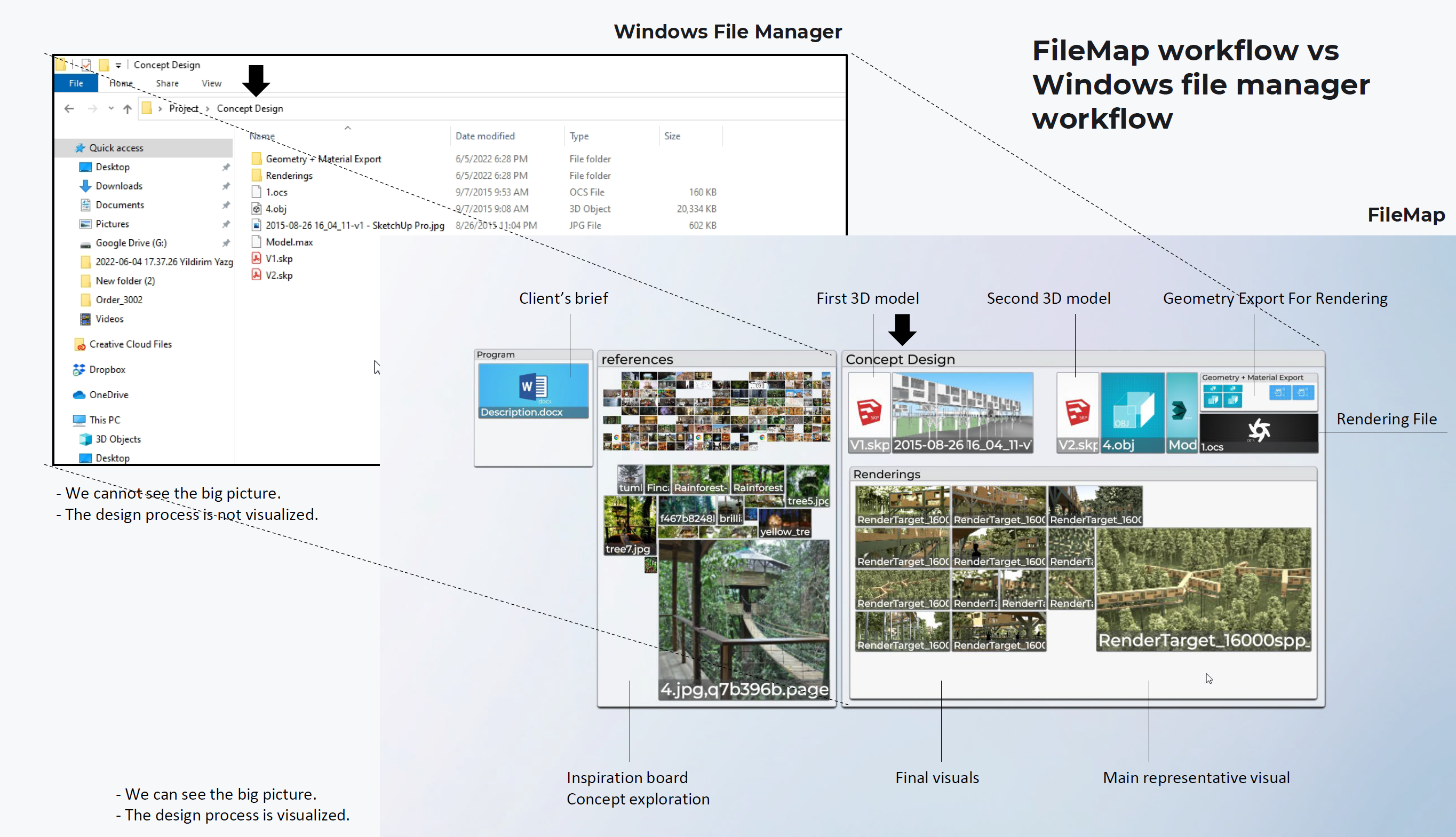
That third principle is the one people underestimate. In a spatial interface, layout becomes a kind of metadata. Position, size, and proximity carry meaning that no folder tree can express. Investigators pinning evidence to a board and designers covering a studio wall discovered this long before software did.
We built FileMap together with a community of architects, industrial designers, and graphic designers, and design schools now use it for collaborative studio work. What we learned from those rooms shaped everything that follows.
What AI changes about what an interface is
Most AI assistance today lives in a chatbox beside the work. You describe your situation in text, the model answers in text, and you carry the answer back to wherever the work actually happens. The assistant is talented but blind. It cannot see what you see, and it has no hands inside your workspace.
I think the more interesting future is different: the agent lives inside a shared spatial canvas, as a collaborator rather than an oracle.
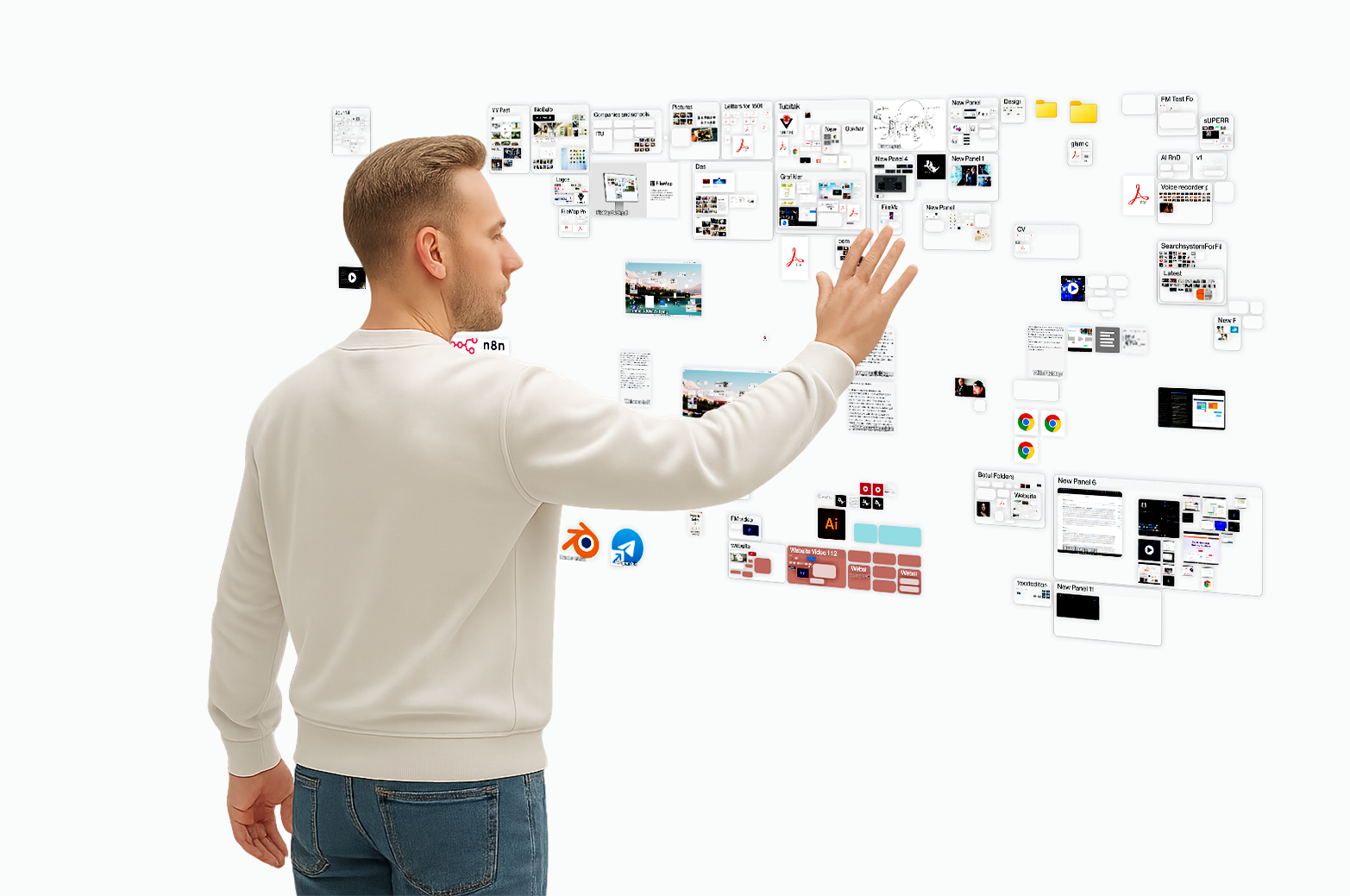
Start by treating every digital object as a particle on that canvas. A file is an object, but so is a website, an application, a live data stream, a note. Once everything shares one space, an AI agent can do things no chatbot can.
It can see the arrangement: what is large, what is central, what sits next to what, what you have been touching. Context stops being something you paste into a prompt. It is simply there.
It can act in the space. Ask it to gather last week's work on the left and last year's proposals below for comparison, and the layout reorganizes while you keep talking. The interface becomes something you converse with rather than operate.
It can remember layouts the way you remember places. If an arrangement served a good conversation on Tuesday, you should be able to say "bring back the layout from the conversation about cities" and stand in that room again. Spatial memory should belong to the workspace, not only to the person.
And it can build understanding through conversation. An agent that asks "what is the most important item here?" and then enlarges your answer is doing two things at once: improving the layout and learning what matters to you. The metadata that file systems never capture, the why behind the what, accumulates as a natural side effect of working.
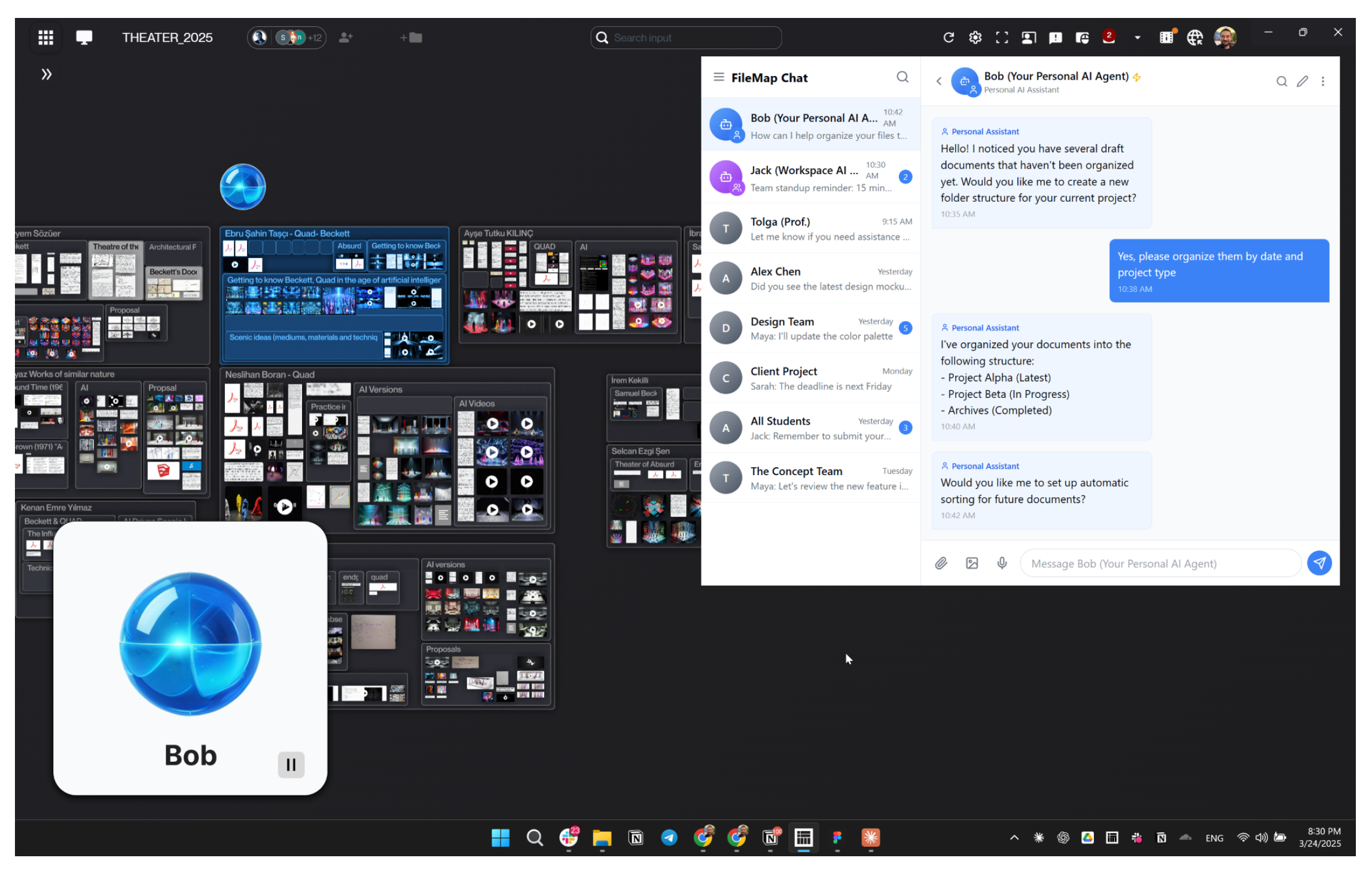
The point of all this is not automation for its own sake. It is flow. Opening and closing windows is clerical work, and clerical work is exactly what breaks concentration. When the interface carries that load, a person can stay inside the thought, and a team can stay inside the conversation.
Fluid interfaces, from desktop to room
Once an interface is spatial and AI can orchestrate it, the screen stops being the boundary.
One scene I keep sketching: a digital canvas ten meters wide running along the wall of a studio. A team stands in front of it, talking. As they talk, the agent pulls up references, opens a 3D model next to a sketch, sets two proposals side by side. Everyone sees the same space, some through the wall display, some through tablets, some eventually through glasses. Nobody has said "wait, let me find that file" in an hour.
The same space follows you to a laptop or a phone, at a different zoom. The organization persists because it lives in the shared canvas, not in any one device. I think of it as a fluid layer above today's applications and file systems, one that adapts its shape to the task, the people present, and the conversation underway.
This is a direction of travel, not a finished product. The entry point is modest on purpose: people just want a better desktop and a better way to see their projects. But the desktop is only the entry point.
Principles: trust, transparency, and human limits
An agent that can see your whole workspace is powerful, and power over a workspace is power over a person's attention and work. So the design principles matter more than the features.
Trust has to be the core value, not a feature added later. We designed the architecture so that nothing is accessed without explicit consent, each person keeps control of their own data, and the agent's reach is something the user grants and can withdraw. My conviction, formed while building these systems, is that people will ultimately trust one agent rather than many, and that trust will be earned the way it is earned between people: through consistency, honest listening, and time.
Transparency follows from that. When an agent reorganizes a layout, tracks progress, or shares anything with anyone, the user should be able to see what happened and why. An interface that acts invisibly on your behalf is indistinguishable from an interface that acts on someone else's.
Proactivity needs restraint. We want agents that offer initiative, asking whether to prepare a comparison or remind the team of a deadline, because users cannot be expected to discover every capability by themselves. But initiative that ignores focus is just interruption with better manners.
And everything should be designed for human cognitive limits rather than against them. Attention is finite. The number of things a person can hold in mind at once is small. In my experience the interface should hold the context, the arrangement, and the history, precisely so the human can hold the thought.
These questions are larger than any product. What makes an agent trustworthy? Can a machine truly listen? What roles should AI play in education, creativity, or emotional life? I believe designers should wrestle with these questions deliberately, in studios and classrooms, before platform defaults answer them for everyone.
The shape of thought
The deeper claim in all of this is simple. An interface is not a neutral container. It is a proposal about how you should think, and for forty years the proposal has been: think in windows, one thing at a time, and remember where you filed everything.
AI gives us the first real chance to withdraw that proposal. Interfaces can now perceive context, hold memory, arrange information meaningfully, and converse. The pieces exist for a workspace that behaves less like a filing cabinet and more like a landscape you inhabit with collaborators, human and artificial.
So the question I keep returning to is not whether AI will change the interface. It clearly will. The question is which way the change runs: will we keep teaching people to think in the shape of windows, or finally build interfaces in the shape of thought?